BRANDROOF / SOCIAL PLANNERYour content this week
SOCIAL PLANNERPlan your posts.
Plan your posts.
Keep your business visible.
Prepare your content, choose your channels and schedule ahead. Keep your team’s posts, approvals and publishing in one organised place.
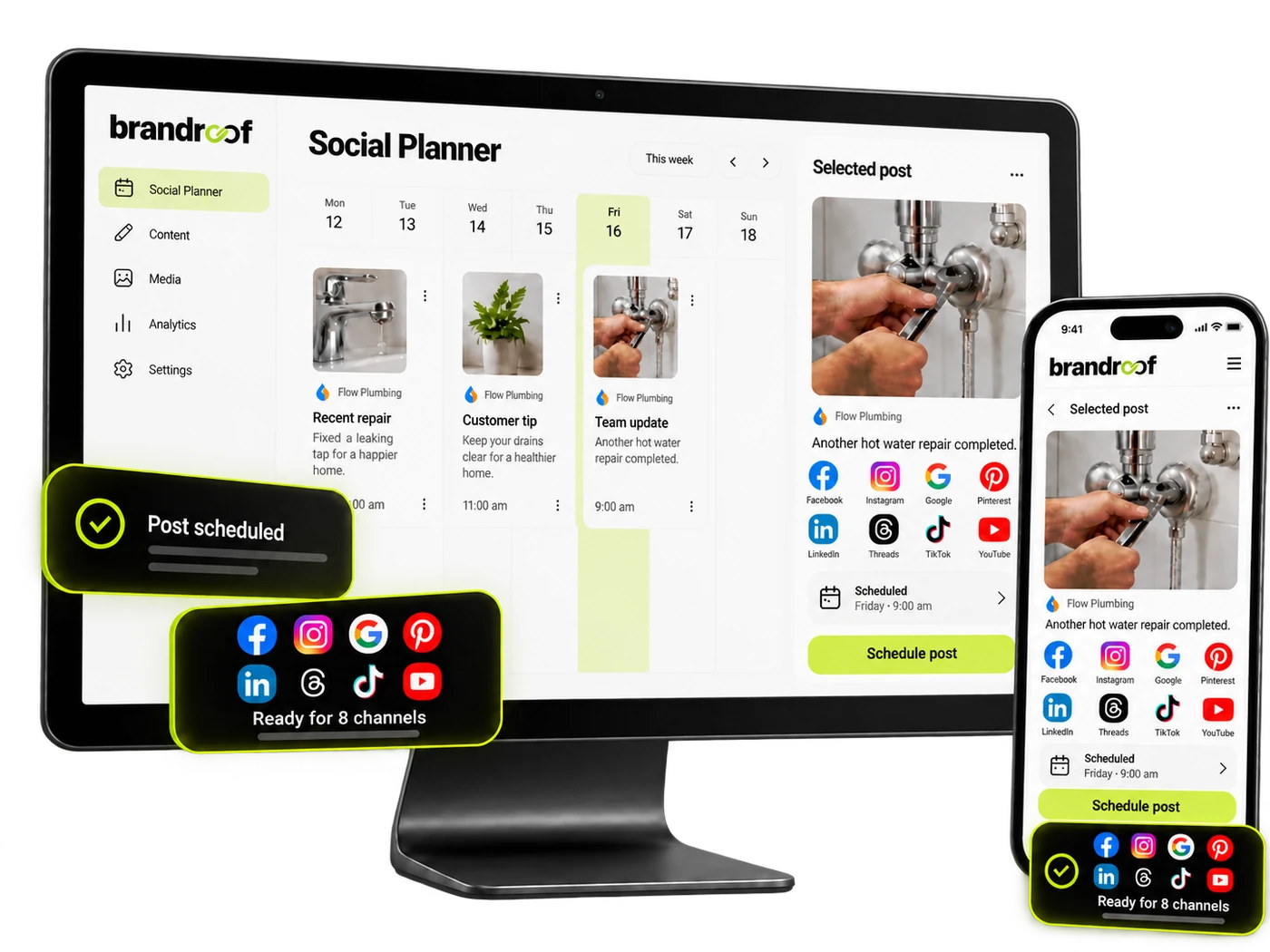
YOUR CONTENT AT A GLANCEKnow what’s ready.
Know what’s ready.
See what’s coming next.
Choose a day in this example calendar to see the planned post.
CONNECT THE PLACES CUSTOMERS FIND YOUYour favourite channels.
Your favourite channels.
One easy place to manage them.
Connect your business accounts once, then create and schedule content without constantly switching apps.
Available post types, account permissions and reporting vary between platforms.
THE PROBLEM WITH DOING IT ALL MANUALLYYour business is busy.
Your business is busy.
Your social media should not be another job.
Most local businesses already have good stories to share. They simply need a practical way to plan them.
No time to post
You are busy serving customers, so social media keeps getting pushed to tomorrow.
✓
Prepare several posts in one sitting and let Brandroof publish them automatically.
Too many apps
The same update has to be copied into Facebook, Instagram and Google separately.
✓
Create one post, choose your channels and tailor the wording where it matters.
Nothing ready to share
Good jobs, customer feedback and useful tips disappear before anyone turns them into a post.
✓
Use templates, a content calendar and AI assistance to turn everyday work into useful posts.
No clear results
You cannot tell which posts people see, respond to or actually care about.
✓
Review available reach, engagement and channel performance in one clear dashboard.
WHAT SOCIAL PLANNER CAN DOEverything you need
Everything you need
to stay visible and organised.
Practical planning tools that help small businesses publish more consistently without adding unnecessary admin.
One visual content calendar
See drafts, scheduled posts, approvals and published content across every connected channel.
Publish across multiple channels
Choose several social accounts at once, then adjust captions and media for each platform.
AI captions and content ideas
Create first-draft captions, useful post ideas and on-brand content when inspiration runs low.
Schedule at stronger times
Choose your own schedule or review recommended posting times based on audience engagement.
Team and client approvals
Ask the right person to review a post before it goes live and keep feedback in one workflow.
Bulk scheduling and templates
Upload up to 90 posts in a supported spreadsheet or start with reusable content templates.
Recurring and evergreen posts
Reuse suitable content, schedule recurring updates and keep important themes in a publishing queue.
Images, videos and previews
Add photos, videos, Reels or Shorts and preview the post before it is scheduled.
Social performance insights
Check available impressions, reach, likes, comments, followers and top-performing content.
MADE FOR BUSINESSES LIKE YOURSYour everyday work
Your everyday work
is already great content.
Choose an example to see how a local business can turn a normal working day into a helpful post.
BONDPRO CLEANING
Finished move-out clean
Another property ready for its final inspection. Our team completed a full kitchen, bathrooms, windows and carpets today.
f◎GScheduled to 3 channels
SEE WHAT IS WORKINGUnderstand your results.
Understand your results.
Keep it simple.
Review the metrics your connected platforms make available, see which channels are creating engagement and use that information to plan stronger content.
- ✓ Compare engagement across connected channels
- ✓ Monitor reach, impressions and interactions
- ✓ Identify posts customers respond to
- ✓ Check account connection and publishing status
SOCIAL PERFORMANCEYour last 30 days
POSTS PUBLISHED28↑ Tracking enabled
PEOPLE REACHED12,840↑ Tracking enabled
ENGAGEMENTS864↑ Tracking enabled
NEW FOLLOWERS142↑ Tracking enabled
Audience engagement
Illustrative example. Available metrics depend on the connected platform.
COMMON QUESTIONSSocial media planning,
Social media planning,
without the confusion.
Which social channels can I connect?+
Connect supported Facebook Pages, Instagram, Google Business Profile, LinkedIn, TikTok, YouTube, Pinterest, Threads and Bluesky accounts. Available features depend on account permissions and each platform.
Can I schedule the same post to multiple channels?+
Yes. Select the connected accounts you want to publish to, then customise the caption or media for individual channels where needed.
Can I plan a whole month in advance?+
Yes. Use the visual calendar, scheduled posts, recurring content, reusable queues or bulk uploads to organise upcoming content ahead of time.
Can someone approve content before it is published?+
Yes. Posts can be saved as drafts or sent for approval, helping business owners and teams review the content before it goes live.
Can AI help me write social media posts?+
Content AI can help generate first-draft captions, ideas and visuals when enabled for your account. You remain in control of reviewing and publishing the final post.
Do I need to be good at social media?+
No. Start by sharing the work you already do: completed jobs, customer feedback, helpful tips, service updates and upcoming availability.
More organised posts.
Less last-minute rushing.
Plan, review and schedule your business content with Brandroof.
Ready to grow
with Brandroof?
Connect your customers, conversations, marketing and payments in one practical business platform.
One post.
Ready for every channel.
Choose where to publish, edit the caption and see how an everyday business update comes together.